Home Copyright © 2000 SnoopSoft, Inc.  
 

SnoopSoft WebCalendar

WebCalendar
Buy it Today!

Purchase WebCalendar bundled with
Dashboard v3.0 and save over 20%!
Buy Dashboard v3 w/ WebCalendar ($17.95US)

Purchase WebCalendar Today module!
Buy WebCalendar ($9.95US)


Try it Today!

WebCalendar Trial for Windows Mobile 5
WebCalendar Trial for Windows Mobile 2003/2003 SE
limited number of days displayed (1) and a limit of 2 services displayed (Outlook + one other).

FAQ

View the WebCalendar FAQ

Background

The award winning SnoopSoft Dashboard product was introduced in 2000 with one goal: To simplify your handheld experience.

That goal was accomplished by making your most important information quickly and easily accessible directly from the Today Page, and over the years we have refined that experience to be as simple as possible.

Today we take that goal to another level entirely by being the first to introduce the most powerful enhancement to the mobile experience - Web Calendaring! SnoopSoft is introducing a Google Calendar plugin for the Windows Mobile Today page that for the very first time will bring together ALL of your Calendar information on one screen (the default Pocket PC Calendar, Google Private Calendars and Google Public Calendars)!

SnoopSoft is exited to announce the availability of our WebCalendar plugin for handheld devices running the Windows Mobile 2003, 2003 SE or Windows Mobile 5 OS!

Disclaimer:
SnoopSoft WebCalendar is completely dependent on other software providers who are still in beta testing with their own offerings (i.e. Google Calendar). As such, functionality may change and the end results can not be guaranteed. However, SnoopSoft finds great potential in this module and will work very hard to keep it functional with any changes made by Google to their Calendar interfaces. Also, as other public calendar interfaces are made available they will be added to this module at no charge as soon as we can get them working (i.e. Yahoo! Calendar; Microsoft Live Calendar).


WebCalendar Have you ever wanted to keep your spouse's calendar available on your device but didn't want to integrate it with your own?

Have you ever wished that you could just download your favorite football team's schedule into your calendar but really didn't want to integrate it with Outlook and all your work appointments already on your device?

If you could have multiple calendars on your device (i.e. Work, Family, Spouse, School, Church...), wouldn't you want the power and flexibility to enable and disable them anytime you want so you can quickly see what's going on yet not completely clutter up your own agenda?

With the combined power of Google Calendars and SnoopSoft Dashboard's WebCalendar Today module now you can do all of these things and much, much more!

SnoopSoft, Inc. is proud to be the first to deliver the power and flexibility of multiple web Calendars displayed right on the Today page of your Windows Mobile device! Mix and match the contents of multiple Google Calendars (both public and private) and assign distinct background colors to let you know at a glance which appointment goes with which calendar. Now you can keep your calendar and your spouse's calendar separate (as separate Google Calendars), yet combine them on the Today page of your device to see when and if they may be available to have lunch with you! The possibilities are endless and for the first time can provide you with a complete view of your entire life schedule on your handheld!

How it works
Google Calendar  
Google Calendar
SnoopSoft WebCalendar
SnoopSoft WebCalendar SnoopSoft WebCalendar

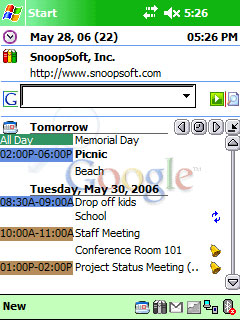
Depicted above (left) is an image of a Google Calendar with 3 separate Calendars displayed (Holidays, Work and Family). Shown to the right of the Google Calendar are 2 images of the SnoopSoft WebCalendar plugin running inside of SnoopSoft Dashboard v3. The SnoopSoft WebCalendar shows how user-defined colors can be assigned to match the Google Calendar so at a glance you can know which appointment goes with which Calendar.

Even though it is possible to do so, Calendars are never physically merged on the device - they are only displayed merged on the screen. With the new flexibility that web calendaring brings, it makes more sense to allow you complete control over what calendars are displayed together on the screen. This provides you much greater flexibility than merging the data into the default Calendar program on the device and having the data permanently merged with no way to split it back out. If for some reason you don't want to see a separate calendar for something you can just disable it (see the section below).

Easily Enable/Disable Calendars
Google Calendar

Calendars can be easily enabled or disabled to free up space on the view simply by tapping on the main date line of the plugin. Doing so will activate a menu that shows which Calendars are available, as well as which are enabled or disabled. Also shown is whether or not the Calendar data was able to be downloaded off the Internet OK.

In a disconnected state it may not be possible to view all dates and this is a way to show which Calendars were unable to load their data for a specific date.

Caches Data for Offline Viewing

SnoopSoft WebCalendar will smartly cache only the data that it needs and you have complete control over how much data it will pull down when it needs to get more information.

The location that it uses to store the data initially defaults to the OS temporary files folder. This can be changed to be a storage card (only if it's always available in the device) or any other folder on the device. NOTE: WM5 users will want to change this setting as the default temporary folder is erased whenever the device is rebooted (soft boot).

Data is only loaded as needed and a manual reload button is provided on the plugin so that you can force it to reload the data when you know you are connected.

View Entry Details while online

When a Google Calendar entry is tapped on the screen, the WebCalendar module will launch Google Calendar directly to that entry as long as the device is connected. This allows for easy editing online through Google. Once complete, just reload the Calendar to get any updates back to the device.

Completely Configurable
Google Calendar

All options are completely configurable! From the distinct background colors used for different Calendars to the location on your device used to store the temporary cache data.

The image above depicts the options available for any Google Calendar. The Days to load (how many days before the currently displayed date, and how many days beyond the currently displayed date) are configurable as well. The WebCalendar plugin will pull this many days down and cache them on the device so when you are not connected to the Internet you can still view Calendar information.

In order to ease the setup burden of copying long Calendar feed URL's to the device, we have created a tool that can be run on any WindowsXP system that can remotely configure the calendars. All settings available through the options on the device for a web calendar are also available through the desktop software and will be copied down to the device automatically at the push of a button.

Feed Export
Share Your Calendars
Feed Export

SnoopSoft WebCalendar has Import and Export capability for sharing your calendar configurations and colors with another person (such as a family member or spouse) or with another device. Simply export the Calendar settings on one device, email or copy them to another device, and then import them.

Dashboard v3 Integration

This plugin is fully integrated with Dashboard v3 and will use the Theme file specified through Dashboard when drawing its graphics.

It can also be used outside of Dashboard as a regular Today plugin but will still use the Dashboard theme for its graphics. If Dashboard v3 is not loaded on the device then a generic theme will be used to draw the icons and graphics for this plugin.

Buy Now for $9.95US

Because this is the initial release and we're doing things on the Pocket PC that have never been attempted before, there will be some issues that arise. We understand this and are therefore making all this functionality available today for the low price of $9.95US!

Ordering Online

Purchase WebCalendar bundled with
Dashboard v3.0 and save over 20%!
Buy Dashboard v3 w/ WebCalendar ($17.95US)

Purchase WebCalendar Today module!
Buy WebCalendar ($9.95US)

Ordering by Phone

1-877-353-7297 (US)
(425) 392-2294